

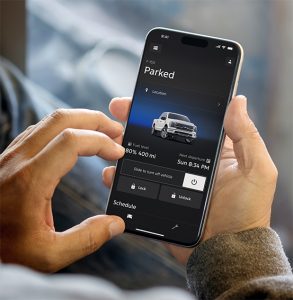
Your Ford ownership experience does not stop after you drive home. Many Ford drivers have helpful technology sitting in their pocket and do not use it nearly as much as they could.
The Ford app can make everyday ownership easier by helping you stay connected to your vehicle, check useful information, schedule service, and access remote features when equipped. Not every feature is available on every model, but many owners may find tools that save time and reduce small daily frustrations.
If you have not explored your Ford app features lately, it may be worth opening the app and seeing what your vehicle can do.
Why the Ford App Matters After the Sale
Modern vehicles do more than get you from one place to another. They also help you manage service, vehicle information, security, and convenience. The Ford app brings many of those tools into one place.
That can be helpful for Miami drivers with busy schedules. You may be commuting through traffic, parking in large lots, managing family errands, or trying to keep up with routine maintenance. The app can make those moments easier by giving you quick access to vehicle information and connected features.
Think of it less like a bonus app and more like part of your Ford ownership technology.
Remote Start Can Make Hot Days Easier
Miami heat can make a parked vehicle uncomfortable fast. When equipped, remote start through the Ford app can help you start your vehicle before you get in.
That can be useful when your Ford has been sitting in the sun. Instead of stepping into a hot cabin and waiting for the air conditioning to catch up, you can start the vehicle ahead of time and give the cabin a chance to cool.
Remote start can also help during rainy weather. Starting your vehicle before you leave work, home, or a store can make the next drive feel more comfortable from the beginning.
When Remote Start Is Especially Helpful
Remote start may be useful before:
- Morning commutes
- Afternoon school pickup
- Grocery runs
- Leaving work
- Weekend trips
- Hot summer errands around Miami
This is one of those Ford app features that can feel small until you start using it regularly.
Lock and Unlock From Your Phone
Almost every driver has had the same thought at some point: did I lock the vehicle?
When equipped, the Ford app can help you lock or unlock your Ford from your phone. That can be helpful when you are inside your home, walking into work, shopping, or helping a family member get something from the vehicle.
It can also be useful if your keys are not immediately in your hand. Instead of digging through a bag or walking back outside just to check, you may be able to handle it from the app.
This feature can add convenience, but it also adds peace of mind. For many owners, that is the real benefit.
Vehicle Location Can Save Time
Parking in Miami is not always simple. Large shopping centers, garages, event lots, beaches, and busy neighborhoods can make it easy to forget exactly where you parked.
When available, vehicle location through the Ford app can help you find your Ford more quickly. That can be useful after a long day, a crowded event, or a rushed errand.
This feature can also help families who share a vehicle. If someone else parked it, vehicle location may help reduce confusion before the next drive.
Vehicle location is not something every driver uses every day. But when you need it, it can save real time.
Fuel, Oil, and Vehicle Information at a Glance
The Ford app can also help you check important vehicle details. Depending on your vehicle and connected services, you may be able to view information such as fuel level, oil life, battery status for electric vehicles, or other vehicle details.
That can help before a busy day.
Maybe you are leaving for work and want to know whether you need gas. Maybe you are planning a weekend drive and want to check oil life before you go. Maybe you drive an EV and want to confirm charge status before heading out.
Instead of waiting until you are in the driver’s seat, the app can put useful information on your phone.
Vehicle Health Details Can Help You Stay Ahead
Some drivers only think about maintenance when a warning light appears. The Ford app can help make vehicle care more proactive.
When equipped, vehicle health details and alerts can help you stay aware of potential needs. That may include maintenance reminders, system information, or helpful updates about your vehicle.
This does not replace paying attention while you drive. It also does not replace professional service. However, it can give you more information between visits.
For busy owners, that matters. A small reminder can help you schedule service before a minor issue becomes more stressful.
Service Scheduling Without the Extra Hassle
One of the most useful Ford app features is service support. Routine maintenance can be easy to delay, especially when life gets busy.
The app can help you connect with service scheduling so you can plan maintenance around your day. That may include oil changes, tire rotations, brake inspections, battery checks, or other recommended services.
For Miami drivers, this can make it easier to stay on track with maintenance. You can check what your vehicle may need, schedule service, and keep ownership moving without making the process feel complicated.
Midway Ford of Miami also offers online service scheduling for drivers who prefer to book directly through the dealership website.
Connected Services Can Add More Convenience
Ford connected services can expand what your vehicle and app can do together. Availability depends on the model, equipment, modem activation, and service plan details.
That is why it helps to check your specific vehicle in the app. Some owners may have access to more features than they realize. Others may need to activate a modem, update settings, or review connected service options.
Connected services may support ownership tools such as remote controls, vehicle information, charging support for EVs, and other app-based conveniences.
The important point is simple: your Ford may already have technology that can make daily driving easier.
Ford App Features for EV and Hybrid Owners
The Ford app can be especially helpful for drivers with an electric vehicle or plug-in model. Depending on the vehicle, owners may be able to view charge status, find charging information, or manage other EV-related features.
That can help reduce guesswork.
If you drive a Mustang Mach-E, F-150 Lightning, or another electrified Ford model, app-based information can support your daily routine. You can check charge level before leaving, think through charging stops, and better understand how your vehicle fits your schedule.
Hybrid owners may also benefit from app-based vehicle information. While a traditional hybrid does not require charging, the app can still support ownership through service reminders, vehicle details, and connected tools when available.
How the Ford App Helps With Daily Ownership
The best part of the Ford app is not one single feature. It is how the features work together.
You can use remote start before walking outside. You can check fuel or charge level before a long day. You can confirm your doors are locked. You can find your vehicle in a crowded lot. You can keep an eye on maintenance needs and schedule service when it is time.
Helpful App Uses Many Owners Overlook
Many Ford owners may use the app for only one or two things. It is worth checking whether your vehicle supports:
- Remote start
- Remote lock and unlock
- Vehicle location
- Fuel or charge level
- Oil life information
- Vehicle health alerts
- Service scheduling
- Connected services access
You do not have to use every feature every day. Start with the ones that solve real problems in your routine.
Getting Started With the Ford App
If you have not used the app much, start simple. Download the Ford app, sign in or create an account, and add your vehicle. Some connected features may require modem activation or vehicle setup.
Once your vehicle is connected, take a few minutes to explore the main sections. Look for remote controls, vehicle status, service information, and connected services.
If you are unsure what your Ford supports, ask the team at Midway Ford of Miami. Our team can help you understand where to start and what features may be available on your vehicle.
When App Features May Vary
It is important to know that Ford app features can vary. Your model year, trim, equipment, connected services, modem status, and vehicle settings can all affect what appears in the app.
That means two Ford owners may not see the same exact tools.
A newer Ford truck, SUV, or EV may offer app-based features that an older model does not. Some features may require activation. Others may depend on vehicle compatibility or connectivity.
This is normal. The best way to know what you have is to connect your vehicle and review the app directly.
Ford Ownership Technology That Supports Real Life
Ford ownership technology should make driving easier, not more complicated. The best features are the ones that fit naturally into your day.
Remote start can help with Miami heat. Vehicle location can help in crowded parking areas. Lock and unlock features can reduce second-guessing. Fuel, oil, and vehicle health details can help you stay informed. Service scheduling can make maintenance easier to manage.
Together, these tools can help your Ford feel more connected to your routine.
Get More Out of Your Ford at Midway Ford of Miami
The Ford app can do more than many owners realize. Whether you drive a Ford truck, SUV, EV, hybrid, or car, it may help you save time, stay informed, and make ownership feel easier.
Midway Ford of Miami serves Fontainbleu, West Chester, Homestead, Hialeah, and the Hammocks for drivers who want to get more out of their Ford ownership experience. Explore your Ford app features, schedule service when needed, and contact Midway Ford if you have questions about your vehicle’s technology.
Connect with us


